
Most of Cisco's routers which are released on or after 2005 has L2TPv3 over IPsec protocol function. (If not, you might be able to upgrade the IOS version to support it.)
- Why Cisco Routers with SoftEther VPN Server is the Best?
The above link shows the advantage of SoftEther VPN Server with the combination with Cisco Routers.
Preparation
Before setup Cisco router you have to setup the SoftEther VPN Server settings.
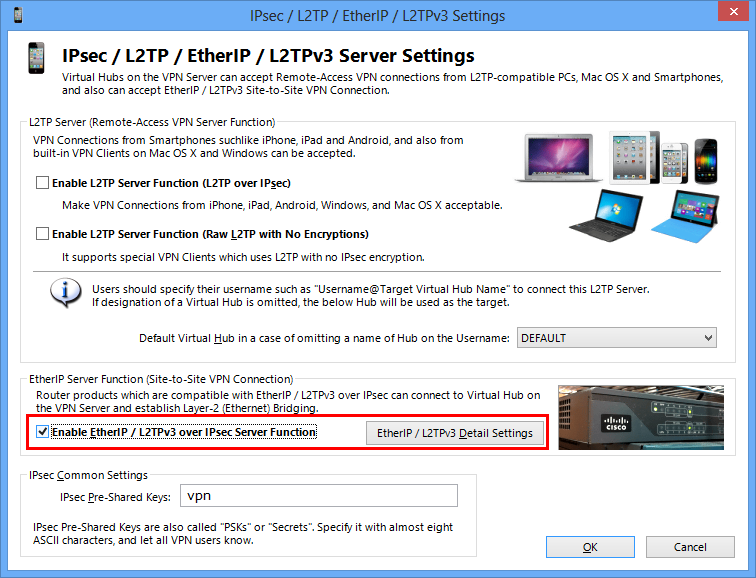
On the above screen, check the "Enable EtherIP / L2TPv3 over IPsec Server Function" and click the "Detail Settings" button. The following screen will appear.
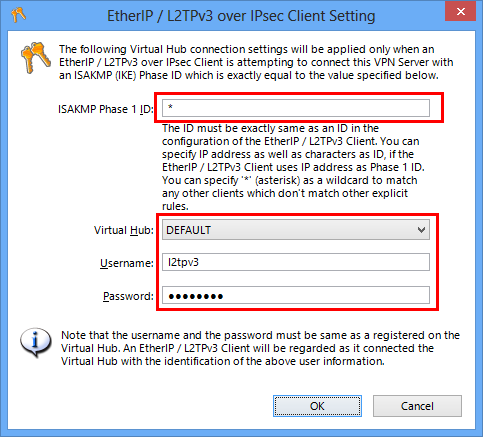
In this screen you have to define a mapping-table between L2TPv3 client (router)'s ISAKMP (IKE) Phase 1 ID, and the destination Virtual Hub's name, username and password.
On the above example, VPN connection attempts from any L2TPv3 routers will be regarded to use the "l2tpv3" username to connect the "DEFAULT" Virtual Hub. (The "l2tpv3" user must be registered on the Virtual Hub.)
Essentially you should specify the Cisco's router's ISAKMP (IKE) Phase 1 ID on the ID field. However, you can specify "*" (wildcard) to match for any IDs. This is lack of security but this time is just a tutorial. So a wildcard is used. In the long-term running system you have to specify the Phase 1 ID exactly instead of a wildcard.
Cisco Router's Configuration Sample #1 (Having a Fixed Physical IP Address)
Example Environment
- Ethernet Ports
FastEthernet 0: WAN Port (IP Address: 2.3.4.5 / Subnet Mask: 255.255.255.0 / DefGW: 2.3.4.254)
FastEthernet 1: Bridge Port
- Destination SoftEther VPN Server IP Address
1.2.3.4
- ISAKMP SA Encryption Settings
AES-256 / SHA / DH Group 2 (1024 bit)
- IPsec SA Encryption Settings
AES-256 / SHA
- IPsec Pre-Shard Key
vpn
Cisco Configuration Sample
conf t
ip classless
ip subnet-zero
no ip domain-lookup
no bba-group pppoe global

spanning-tree mode mst
spanning-tree extend system-id
vtp mode transparent

interface FastEthernet 0
ip address 2.3.4.5 255.255.255.0
duplex auto
speed auto
arp timeout 300
no shutdown
exit

interface FastEthernet 1
no ip address
duplex auto
speed auto
arp timeout 300
no shutdown
exit

ip routing
ip cef

no cdp run

ip route 0.0.0.0 0.0.0.0 2.3.4.254 permanent

pseudowire-class L2TPv3
encapsulation l2tpv3
ip local interface FastEthernet 0
exit

crypto isakmp policy 1
encryption aes 256
hash sha
authentication pre-share
group 2
exit

crypto isakmp key vpn address 0.0.0.0 0.0.0.0
crypto isakmp keepalive 10 2 periodic
crypto ipsec fragmentation after-encryption
crypto ipsec transform-set IPSEC esp-aes 256 esp-sha-hmac
mode transport
exit

crypto map MAP 1 ipsec-isakmp
set peer 1.2.3.4
set transform-set IPSEC
match address IPSEC_MATCH_RULE
exit

ip access-list extended IPSEC_MATCH_RULE
permit 115 any any
exit

interface FastEthernet 0
crypto map MAP
exit

interface FastEthernet 1
no cdp enable
xconnect 1.2.3.4 1 pw-class L2TPv3
bridge-group 1
exit
Cisco Router's Configuration Sample #2 (Having a DHCP-Assigned Physical IP Address)
Example Environment
- Ethernet Ports
FastEthernet 0: WAN Port (Automatic Lease IP Address from DHCP Server)
FastEthernet 1: Bridge Port
- Destination SoftEther VPN Server IP Address
1.2.3.4
- ISAKMP SA Encryption Settings
AES-256 / SHA / DH Group 2 (1024 bit)
- IPsec SA Encryption Settings
AES-256 / SHA
- IPsec Pre-Shard Key
vpn
Cisco Configuration Sample
conf t
ip classless
ip subnet-zero
no ip domain-lookup
no bba-group pppoe global

spanning-tree mode mst
spanning-tree extend system-id
vtp mode transparent

interface FastEthernet 0
ip address dhcp
duplex auto
speed auto
arp timeout 300
no shutdown
exit

interface FastEthernet 1
no ip address
duplex auto
speed auto
arp timeout 300
no shutdown
exit

ip routing
ip cef

no cdp run

pseudowire-class L2TPv3
encapsulation l2tpv3
ip local interface FastEthernet 0
exit

crypto isakmp policy 1
encryption aes 256
authentication pre-share
group 2
exit

crypto isakmp key vpn address 0.0.0.0 0.0.0.0
crypto isakmp keepalive 10 2 periodic
crypto ipsec fragmentation after-encryption
crypto ipsec transform-set IPSEC esp-aes 256 esp-sha-hmac
mode transport
exit

crypto map MAP 1 ipsec-isakmp
set peer 1.2.3.4
set transform-set IPSEC
match address IPSEC_MATCH_RULE
exit

ip access-list extended IPSEC_MATCH_RULE
permit 115 any any
exit

interface FastEthernet 0
crypto map MAP
exit

interface FastEthernet 1
no cdp enable
xconnect 1.2.3.4 1 pw-class L2TPv3
bridge-group 1
exit
Cisco Router's Configuration Sample #3 (PPPoE WAN Connection)
Example Environment
- Ethernet Ports
FastEthernet 0: WAN Port (Automatic Obtain IP Address via PPPoE)
FastEthernet 1: Bridge Port
- Destination SoftEther VPN Server IP Address
1.2.3.4
- ISAKMP SA Encryption Settings
AES-256 / SHA / DH Group 2 (1024 bit)
- IPsec SA Encryption Settings
AES-256 / SHA
- IPsec Pre-Shard Key
vpn
Cisco Configuration Sample
conf t
ip classless
ip subnet-zero
no ip domain-lookup
no bba-group pppoe global

spanning-tree mode mst
spanning-tree extend system-id
vtp mode transparent

interface FastEthernet 0
no ip address
duplex auto
speed auto
arp timeout 300
no shutdown
exit

interface FastEthernet 1
no ip address
duplex auto
speed auto
arp timeout 300
no shutdown
exit

ip routing
ip cef

no cdp run

interface FastEthernet 0
pppoe enable
pppoe-client dial-pool-number 1
exit

interface FastEthernet 1
no ip address
exit

interface Dialer 1
ip address negotiated
encapsulation ppp
dialer pool 1
dialer-group 1
ip mtu 1454
keepalive 15 6
ppp authentication chap callin
ppp chap hostname [email protected]
ppp chap password 0 nekojamu
dialer idle-timeout 0
dialer persistent
exit

ip route 0.0.0.0 0.0.0.0 Dialer1 permanent

pseudowire-class L2TPv3
encapsulation l2tpv3
ip local interface Dialer 1
exit

crypto isakmp policy 1
encryption aes 256
hash sha
authentication pre-share
group 2
exit

crypto isakmp key vpn address 0.0.0.0 0.0.0.0
crypto isakmp keepalive 10 2 periodic
crypto ipsec fragmentation after-encryption
crypto ipsec transform-set IPSEC esp-aes 256 esp-sha-hmac
mode transport
exit

crypto map MAP 1 ipsec-isakmp
set peer 1.2.3.4
set transform-set IPSEC
match address IPSEC_MATCH_RULE
exit

ip access-list extended IPSEC_MATCH_RULE
permit 115 any any
exit

interface Dialer 1
crypto map MAP
exit

interface FastEthernet 1
no cdp enable
xconnect 1.2.3.4 1 pw-class L2TPv3
bridge-group 1
exit
